Base Context and Specialized Context: The Pattern That Scales
Years ago, as a mobile engineering manager, deploying your application to the app store was a huge challenge. So to make it easier, one of the first investments I made was getting a CI/CD process in place. It all started with a Mac Mini running TeamCity. It worked great, supporting 10 engineers deploying 5 applications. Then all of a sudden, I was asked to scale the approach across the enterprise.
Implementing DevSecOps at enterprise scale can be an incredible challenge. Every team had their own deployment process. Some managed their own CI/CD pipelines. Some had manual releases. Some had documentation. Most had none. At an enterprise level, it took on average 120 days to get code into production. Yes, 4 months from commit to customer. Every team I interviewed had a reason. Some cited compliance, some cited production gates and approval processes. All were bad excuses.
We started with each business unit having their own CI/CD process and tools. Each team had to configure their process with their business unit and enterprise rules.
How could we get them to come together? What we built wasn't a rulebook or a set of laws. We built a single working deployment pipeline that was easy to configure to comply with their governance policies. Build, test, scan, deploy. That pipeline became the base class. Over the course of 2 years, every team inherited it. Not because they had to, but because they WANTED to. We made the secure path the simplest path.
Almost no developer reads 500 pages of GRC policy. The CI/CD processes they built weren't even compliant with their business unit's rules. They needed an enterprise solution that works. They needed a pipeline they could inherit and configure that was simple, secure, compliant.
Four years later, the initial POC built on a Mac Mini had grown into a cloud SaaS platform serving 4,000 engineers across 2,000 applications. Deployment time dropped from 120 days to under 30. Licensing costs fell. Most importantly, we achieved 100% adoption without mandates.
The teams didn't adopt because we gave them rules. They adopted because we gave them a working parent pipeline. The pipeline handled the common cases. Teams only had to think about what was unique to their context.
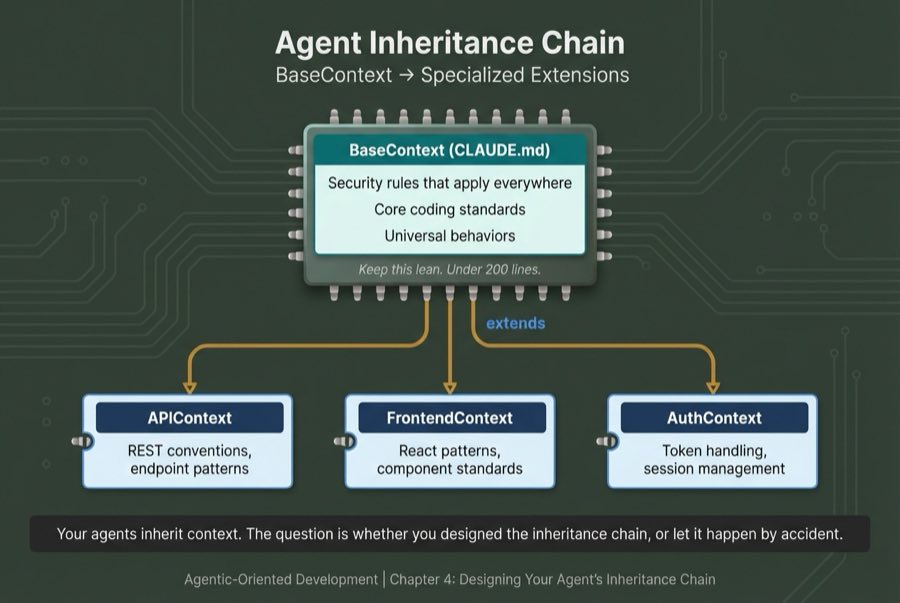
Recently, reflecting on this experience got me thinking that this was just like OOP in college. In agentic development, I provide agents a memory file (Base Class), and subagents inherit and add to the memory, just like custom classes.
Why Rules Get Ignored
First, let me explain why your carefully crafted CLAUDE.md/Agent.md/Gemini.md instructions might not be working.
You've exceeded its memory capacity. You don't get a warning or an error, all you get is bad performance and unreliable actions.
LLMs only remember 150 to 200 lines of instruction well. Claude's system prompt already uses some before you even add a line. That leaves you with a budget of about 100 to 150 lines before you start to see performance drop. When you exceed that total, the number of mistakes and rework increases.
I've seen developers treat CLAUDE.md like a massive catch-all. Every time something goes wrong or they learn a new trick, they add another rule. The file grows to be so long, the developer doesn't even know what's in it anymore. They wonder why their anti-ai rule "never use semicolons" gets ignored alongside their "always run tests before committing" rule. Both rules were ignored by your coding agent because the model prioritized its own needs.
This mirrors what happens when you try to tell developers they HAVE to use a specific tool or process. And just like in life, we need to configure our agents to make the right choice the easiest choice.
For agentic development, if we want agents to do what is asked, it's critical that we create a lean memory base and use specialized subagents that extend the base with specialized instructions so that the agents don't get so overloaded that they prioritize their own needs.
The Inheritance Parallel
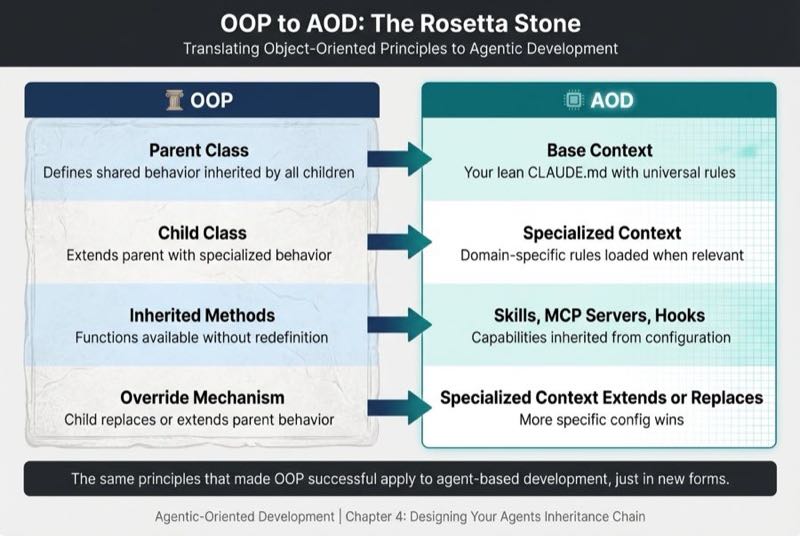
In OOP, you define behavior once in a parent class, then let child classes inherit and specialize. Agent context works the same way:
| OOP Concept | AOD Equivalent |
|---|---|
| Parent class | Base context (your lean CLAUDE.md) |
| Child class | Specialized context (loaded when relevant) |
| Inherited methods | Skills, MCP servers, hooks |
| Override mechanism | Specialized context extends or replaces base behavior |
(Tool-agnostic note: Claude Code uses CLAUDE.md. Cursor uses .cursorrules. OpenAI Codex uses AGENTS.md. The inheritance pattern applies to all platforms.)
Base Context vs Specialized Context
Context specialization is critical to getting your agents to do what you want.
Base Context are the high-level requirements:
- Security rules (Never commit secrets)
- Coding standards (TypeScript strict mode)
- Project architecture (folder structure, patterns)
Specialized Context is the specific context your subagent needs to do its task:
- Backend (API work needs endpoint patterns)
- Frontend (Test all frontend tests with Playwright)
- Testing (All PRs need tests)
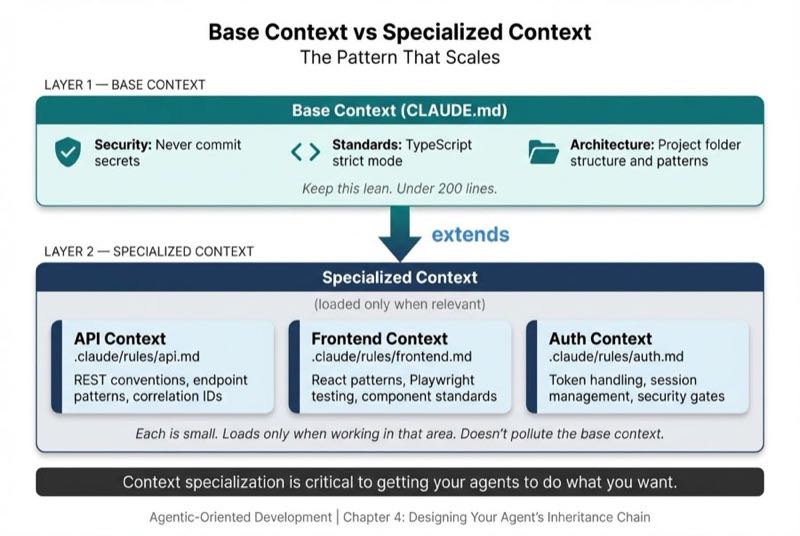
Here's the practical structure:
project/
├── CLAUDE.md                    # Base context (lean, universal)
└── .claude/
    └── rules/
        ├── api.md               # Extends base for API work
        ├── frontend.md          # Extends base for React work
        └── auth.md              # Extends base for auth work
What Gets Inherited
There are four types of capability that agents inherit.
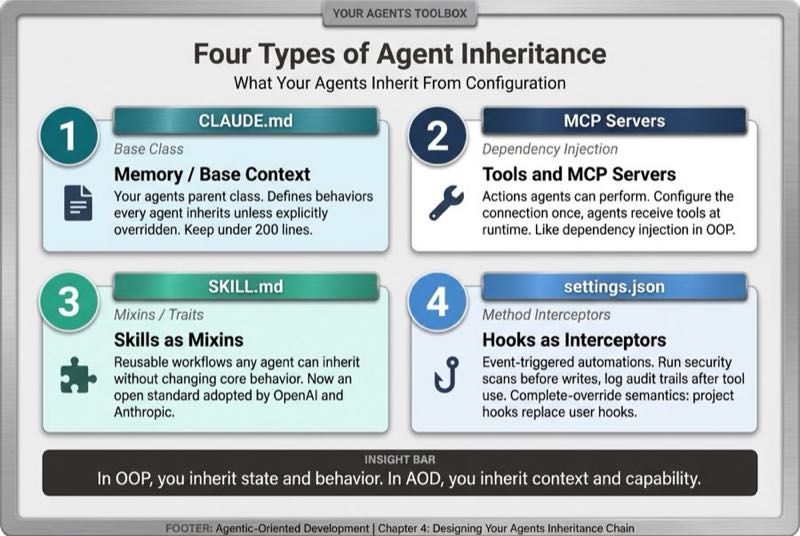
CLAUDE.md is your base context, your agent's parent class. It defines the behaviors every agent inherits unless explicitly overridden. Keep it under 200 lines.
Tools are the actions agents can perform. Like methods in OOP, they define what operations are possible. Some tools are built-in (file operations, shell commands, web search). Others are provided through MCP servers that connect to external systems like GitHub, Jira, or databases. You configure an MCP server once, and agents inherit access to its tools without reconfiguration.
Skills are reusable workflows. Think of them as mixins or traits. You define a code review workflow once, and any agent that needs it inherits the skill rather than duplicating instructions.
Hooks are event-triggered automations. Like method interceptors in OOP. They run security scans before file writes or log audit trails after tool use.
Tools and MCP Servers
Tools are capabilities your agent can use. There are some base-level tools your agent can use, like reading files, writing code, and executing commands. But usually subagents need more. That's where MCP (Model Context Protocol) servers come in.
MCP servers work like dependency injection. You configure the connection once, and agents receive the tools at runtime. An example of this is that I like to give my testing subagent access to the Playwright tool. This way, it can test all frontend tests in an actual browser. Tools like this give subagents the functionality needed to do their job.
Skills as Mixins
Skills work like mixins in OOP. Any agent can inherit a skill without changing its core behavior.
Anthropic published the SKILL.md format as an open standard (agentskills.io). OpenAI adopted it for Codex CLI. Skills are becoming agent-agnostic.
Hooks as Method Interceptors
Hooks are one of the most powerful capabilities, and most misunderstood. Here's how hooks work in practice. Your agent is about to commit a file to git. Before it commits, the pre-commit hook is run. This hook checks for secrets. If it finds one, it blocks the commit.
Hooks do NOT accumulate. Project-level hooks completely override user-level hooks. This is complete-override semantics, like a child class replacing a parent method entirely.
Seven hook event types cover the full lifecycle: PreToolUse and PostToolUse for tool execution, UserPromptSubmit for input handling, PermissionRequest for security gates, Stop and SubagentStop for completion events, and SessionEnd for cleanup.
Memory Locations
All major agent platforms support config files at multiple levels:
- Global (
~/.claude/CLAUDE.md): Personal preferences across all projects - Project (
./CLAUDE.md): Team rules shared via git - Local (
./CLAUDE.local.md): Personal overrides, gitignored
My recommendation: use project-level as your base context. It's version-controlled, shared with the team, and changes go through code review. When someone asks "who approved this config change?" the answer is in your git history. The .claude/rules/ directory is where specialized contexts live.
These memory locations handle most inheritance needs. But what happens when a single agent's context budget can't hold everything your project requires?
Subagent Context Isolation
There's another inheritance mechanism that solves the context budget problem at scale: subagents.
Subagents operate in isolated context windows, completely separate from the main conversation. Each subagent starts with a clean slate. It inherits the base configuration and receives tools based on its definition, but it doesn't carry the weight of the entire conversation history.
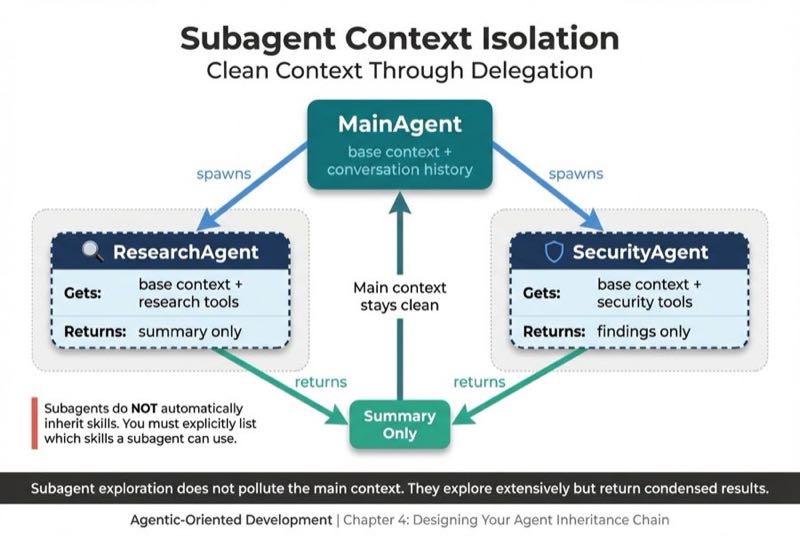
When I spawn a subagent to do research, it can explore extensively without polluting my main context. It reads dozens of files, searches the codebase, builds understanding. Then it returns a summary. My main context stays clean.
One key difference: subagents do NOT automatically inherit skills. You must explicitly list which skills a subagent can use. This forces you to think about what each specialized agent actually needs.
Override Patterns: Extending vs Replacing
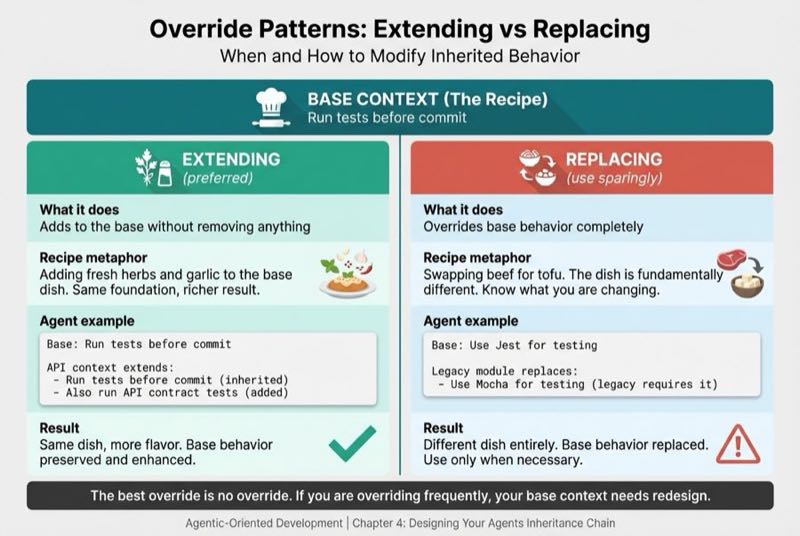
In OOP, child classes can extend parent behavior or replace it entirely. The same applies to agent context.
Extending (preferred): Add to the base without removing anything.
# Base context
- Run tests before commit

# API context extends
- Run tests before commit (inherited)
- Also run API contract tests (added)
Replacing (use sparingly): Override base behavior completely.
# Base context
- Use Jest for testing

# Legacy module context replaces
- Use Mocha for testing (legacy code requires it)
The best override is no override. If you're overriding frequently, your base context needs redesign.
Designing Deliberate Inheritance
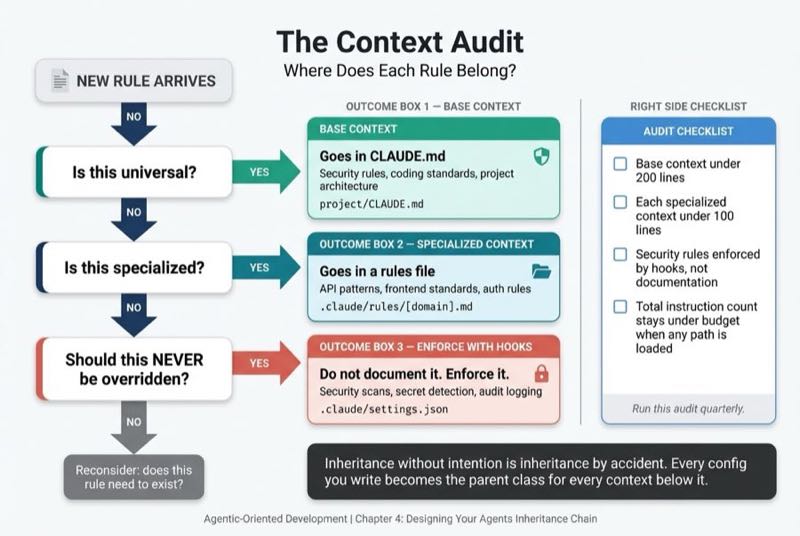
I use what I call the Context Audit. Ask for each rule:
- Is this universal? → Goes in base context (CLAUDE.md)
- Is this specialized? → Goes in a rules file, loaded when relevant
- Should this NEVER be overridden? → Enforce with hooks, not documentation
Practical checklist:
- Base context under 200 lines
- Each specialized context under 100 lines
- Security rules enforced by hooks, not documentation
- Total instruction count stays under budget when any path is loaded
Run this audit quarterly. As your project grows, what belongs in base vs specialized shifts.
Context Sprawl: The Anti-Pattern
Context sprawl is vibe coding at the architecture level. Instead of hoping the agent figures out your intent from a vague prompt, you're hoping your scattered instruction files magically compose into coherent behavior. They won't. The cost shows up in debugging time, inconsistent agent behavior, and the slow erosion of team trust in the tools.
Context sprawl looks like this:
- CLAUDE.md files in every directory
- Conflicting rules at different levels
- Agents producing inconsistent output depending on entry point
- "Works in my folder" as the new "works on my machine"
The fix:
- Regular context audits
- Clear ownership of base vs specialized contexts
- Hooks for enforcement, not just documentation
- Progressive loading for specialized context
Before we built the pipeline, each team's deployment process was a configuration unto itself. After, they inherited a working base and extended only what made their platform different. The same discipline that scaled human teams scales agent teams.
Why This Matters Now
Simple projects don't need inheritance. A flat config works fine.
Complex projects need inheritance. Without it, you're copy-pasting rules and hoping they stay in sync.
Larger codebases demand inheritance. It's not optional.
The parallel to my DevOps story is exact. We started with a Mac Mini and one team. We scaled to 4,000 engineers across 2,000 applications. Deployment dropped from 120 days to under 30.
The key wasn't governance. It was a working base class. Teams inherited a functional pipeline. They extended it with platform-specific steps. Nobody read a 500-page manual. They got a working parent class and specialized from there.
Your agent configuration should work the same way. A lean base context that handles 80% of cases. Specialized contexts that load when relevant. Subagents that dive deep without polluting the main context.
When you inherit well, your agents know the rules without being told. Security scans run automatically. Code follows team patterns. Not because someone remembered to configure it. Because the configuration inherited from a base context that got it right once.
That's the power of deliberate inheritance. One base context produces many specializations, consistent behavior, lower risk, and faster delivery.
Just like OOP promised. Just like our pipeline delivered. Just like your agent configuration can provide.
What's Next
This is Part 4 of a series on Agentic-Oriented Development.
Coming next: The Prompt Is the Interface
We've covered how context is encapsulated, how tools abstract complexity, and how configuration flows through inheritance. The final pillar completes the picture. In Chapter 5, I'll explore how natural language becomes the polymorphic interface, dispatching identical requests to entirely different agent specialists. One interface. Many implementations. The same pattern that made OOP powerful, now powering agent delegation.
With all four pillars in place, Part II will show you how to apply them across the full Agent Development Lifecycle.