Designing Agent Interfaces That Hide Complexity and Enable Capability
One question killed our entire sprint demo.
"How is this distributed to other iPads?"
Mouths hung open. We had no plan.
We were two weeks into building an Innovation Portfolio app for a Fortune 500 financial institution's Chief Innovation Officer. On my team lead's iPad, the app looked perfect. Clean UI. Core features implemented. A polished demonstration of technical capability.
We thought we were done. Then that question landed.
We had tools. We had skill. What we lacked was a framework that connected our work to the actual objective. We thought we were building an app. We should have been building a decision-making tool for the board of directors.
I've thought about that moment a lot since. Agents today have the same problem.
The Missing Toolkit
This was my first mobile development team. A Fortune 500 innovation lab. Two-pizza team concept. A manager in Malaysia who I rarely heard from. I had framed this isolation as opportunity. My shot. I was going to build something that mattered.
The retrospective was uncomfortable. My team lead and I had to admit we had optimized for the wrong things. We identified what was tactically missing: a deployment strategy, stakeholder alignment, success metrics that extended beyond "does it work?" We delivered that plan in two weeks.
But the strategic shift took longer. We had to coach ourselves to deliver outcomes, not outputs. To think beyond the code to the value it was supposed to create. When we adopted a product-led mindset, we stopped optimizing for our perceived objectives and started delivering against the real ones.
The payoff came a few months later. After our next presentation, I got an unexpected call from my manager's manager. The board wanted to see our work. In person. Same app. Same team. Different result.
What changed was not our capability. What changed was our framework. The processes, the mindset, and the interfaces we used to translate skill into value.
I introduced governance for agents in Chapter 2. But governance is only half the picture. Agents also need a framework for how to use their tools. Tools without framework produce outputs without outcomes. The same shift that transformed my team transforms how agents work.
Abstraction in OOP vs AOD
In object-oriented programming, methods are interfaces to behavior. When you call file.save(), you do not care how the file system handles block allocation. You do not care about journaling or write-ahead logging. You express intent. The method handles implementation.
This is abstraction: hiding complexity behind well-defined interfaces. The caller works with what something does, not how it does it.
If you've been doing OOP for any length of time, this feels intuitive. Here's how it maps to agents.
AOD parallel: Tools are the new methods.
When an agent "opens a pull request," it does not construct HTTP headers or manage OAuth tokens. It does not handle rate limiting or parse API error responses. The agent expresses intent in natural language. The tool handles execution.
Consider how this maps across the abstraction stack:
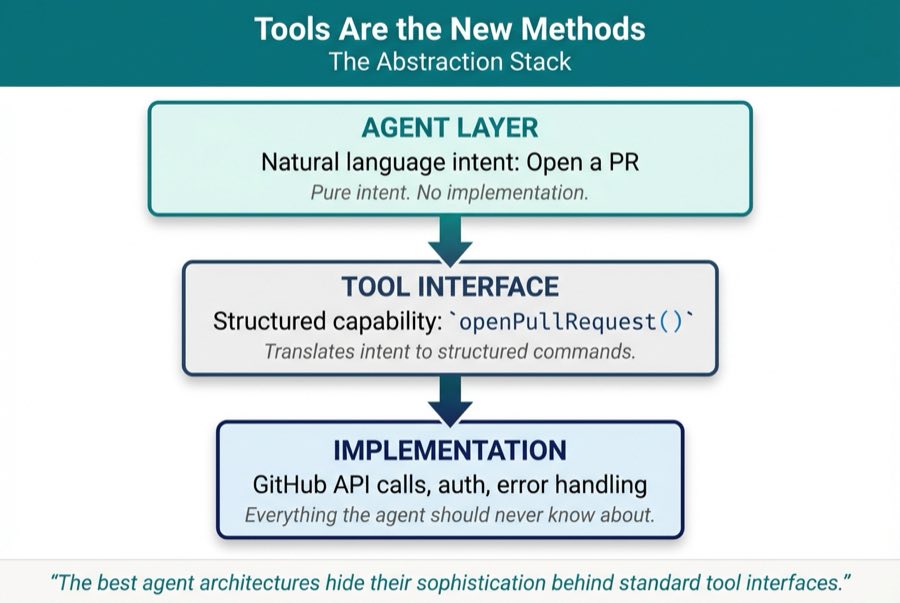
The agent operates at the top layer. Pure intent. The tool interface translates that intent into structured commands. The implementation handles everything the agent should never need to know about.
This is not just convenient. It is essential. An agent that must understand every API detail is an agent that cannot scale. An agent that works through abstracted tools can compose capabilities without drowning in complexity.
The best agent architectures hide their sophistication behind standard tool interfaces. I introduced this principle in Chapter 1. Here is where it becomes concrete.
MCP and the Standardization of Agent Tools
If you were building web services in the early 2000s, you remember what integration looked like before REST.
Every connection was custom. Data formats negotiated case by case. Authentication schemes reinvented every time. Every integration was bespoke and expensive.
REST changed that. One standard interface meant knowing how to call one API meant knowing how to call thousands. The ecosystem exploded.
I've been watching the same thing happen with AI agents. MCP is the REST moment for agentic development.
Before MCP, every agent tool was bespoke. Want your agent to manage files? Write a custom integration. Want it to query a database? Another custom integration. Every capability required new code, new testing, new maintenance.
After MCP, tools become portable, reusable, and composable. The same GitHub MCP server works across Claude Code, Cursor, Windsurf, and any other MCP-compatible agent. Tool developers build once and deploy everywhere. Agent developers compose tools without reinventing the wheel.
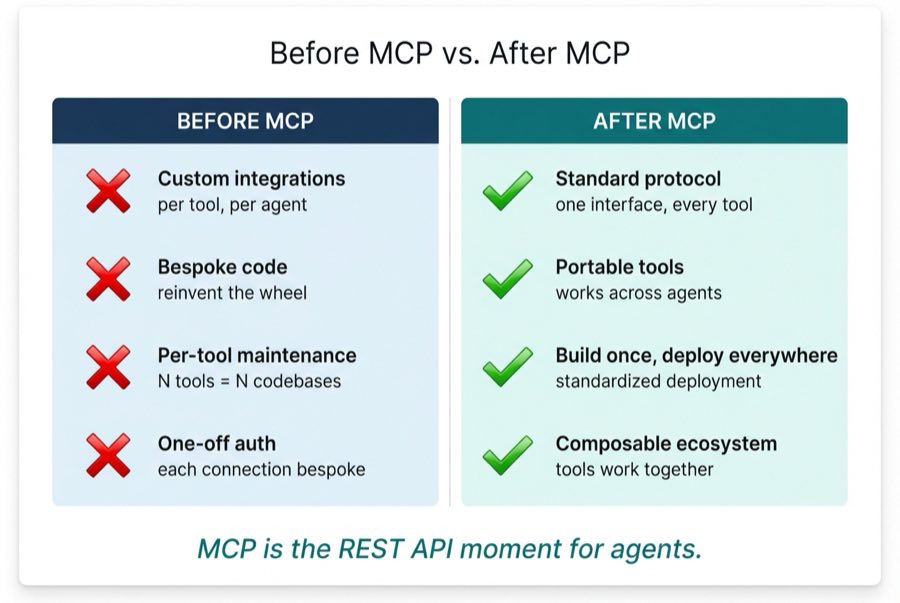
Here is what this looks like in practice. The GitHub MCP server handles pull request management. When an agent needs to create a branch for a feature:
- Agent expresses intent: "Create a branch called feature/user-auth"
- MCP server handles: authentication, API versioning, error handling, rate limiting
- Agent receives: success confirmation and branch reference
The agent never touches the GitHub API directly. It never manages OAuth flows or parses error codes. It works at the level of intent, and the tool handles everything else.
This is abstraction applied to agentic systems. This is how we scale.
Abstraction at Scale: Composing Tools into Pipelines
The GitHub example shows abstraction with a single tool. But the real power emerges when you compose multiple tools into pipelines that the agent orchestrates.
Running a security review used to mean running multiple scans and reviewing multiple reports. SAST for code vulnerabilities. IaC validation for infrastructure misconfigurations. SCA for dependency risks. Each tool had its own CLI, its own output format, its own quirks. Then came CI/CD pipelines, where you could automate scans as part of deployment. In 2026, we can shift security left to the IDE itself, thanks to agentic development.
In my development workflow, I created a command called /security-review. That single command triggers three security scans in parallel. A SAST MCP server scans code for OWASP Top 10 vulnerabilities, hardcoded secrets, and code smells. An IaC skill checks Terraform and Kubernetes configurations for misconfigurations, compliance violations, and drift. An SCA MCP server analyzes dependencies against CVE databases, license conflicts, and outdated versions. Each tool runs independently, with its own specialized logic.
When the scans finish, the command hands the raw findings to a report-formatter skill. It consolidates everything into one report. Critical findings first, grouped by severity, with remediation suggestions. Two MCP servers plus two skills, orchestrated by a single command.
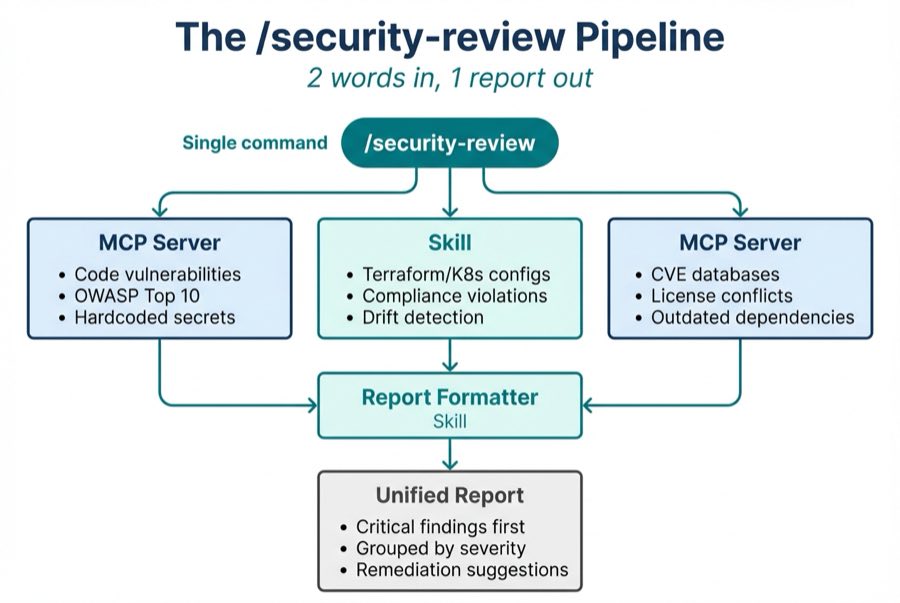
This is abstraction in action. I express intent with two words. The command handles execution. The complexity stays hidden. I never touch three different CLIs. I never reconcile three different output formats. I never remember which flags each tool needs.
The pattern generalizes beyond security. Any workflow that requires multiple specialized tools becomes a candidate for this kind of composition. Code review pipelines, documentation generation, and test coverage analysis all qualify. The agent becomes the orchestration layer that humans used to be.
Designing Tools for Agents
Not all tools are created equal. A poorly designed tool is like a poorly designed API: technically functional but practically frustrating. The agent will misuse it, work around it, or ignore it entirely.
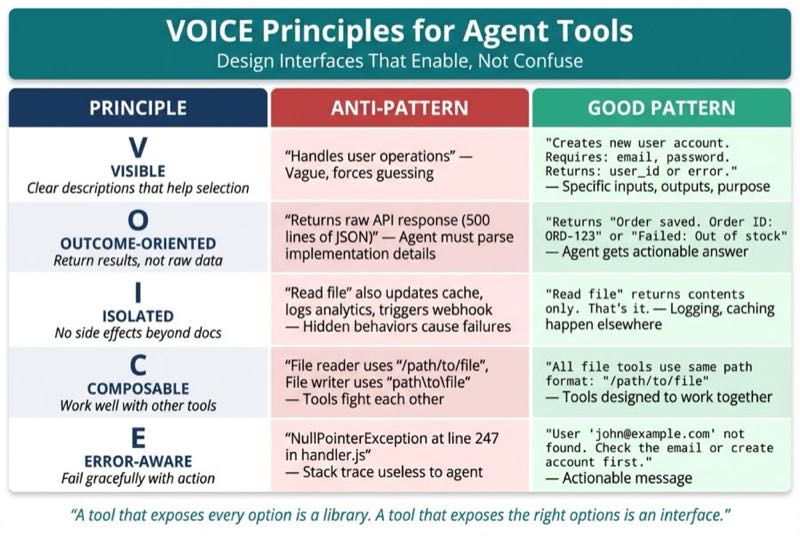
I've found it useful to think about tool design through what I call the VOICE Principles:
V - Visible: Clear descriptions that help agent selection. The agent reads your tool description to decide whether to use it. If the description is vague, the agent will guess. Badly.
O - Outcome-oriented: Return results, not raw data. An agent asking "did the PR merge?" should get a boolean and a summary, not a 500-line JSON response to parse.
I - Isolated: No side effects beyond documented behavior. A tool that "reads a file" should not also update a cache or log to an external system. Predictable tools enable reliable agents.
C - Composable: Work well with other tools. A file reading tool and a file writing tool should operate on the same path conventions. Tools that fight each other create agents that fail unpredictably.
E - Error-aware: Fail gracefully with actionable messages. "Permission denied" is useful. A stack trace is not. Help the agent understand what went wrong and what to try next.
Here's what I realized: these are the same principles from that toolkit my team lead and I built after our failed demo. Visible expectations at each step. Outcome-oriented metrics focused on stakeholder value. Isolated project boundaries. Composable processes that worked across different project types. Error-aware retrospectives that surfaced what went wrong without blame.
A tool that exposes every option is a library. A tool that exposes the right options is an interface. Design for the second.
When to Build Custom Tools
The default answer is: do not build custom tools. Use existing MCP servers. The ecosystem is young but growing fast, and most common capabilities already have community implementations.
Build custom tools when:
You have proprietary systems. Your internal inventory database, your custom CRM, your legacy mainframe. No one else is building tools for these.
You need domain-specific abstractions. A general-purpose SQL tool works. But a tool that understands your organization's data model and exposes high-level operations like
get_customer_risk_profile()works better.The general tool is too verbose for your use case. If every interaction requires the agent to pass fifteen parameters, you need a wrapper that encodes your defaults.
Here is a simple decision framework:
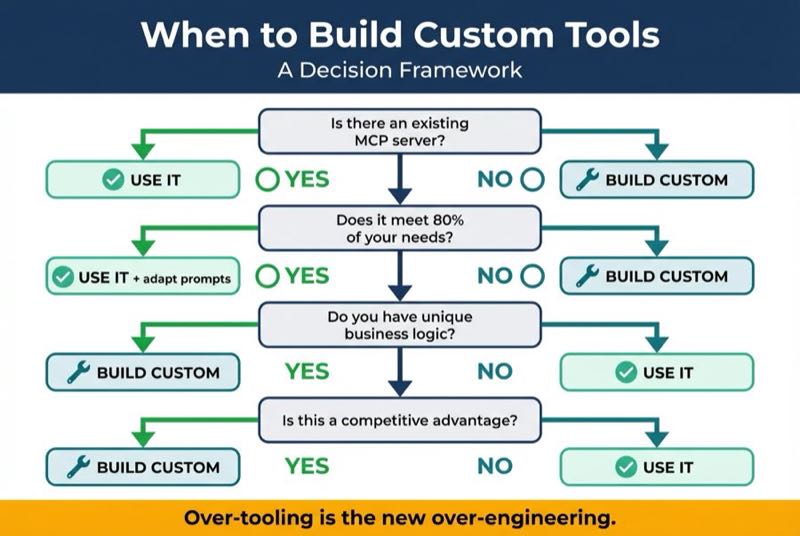
A warning: over-tooling is the new over-engineering. Every custom tool is maintenance burden. Every custom tool is a surface area for bugs. Every custom tool is something you have to update when the underlying systems change.
Build tools that matter. Use tools that exist. The goal is agent capability, not tool collections.
Tools as Governance
In Chapter 2, I introduced the Governance Triad: PM Agent, Architect Agent, and Team Lead Agent working together with clear boundaries. Those boundaries are enforced through tools.
The PM Agent does not get file system access. Not because we cannot give it file system access, but because it should not need it. Its job is stakeholder alignment and requirements refinement. Its tools are document creation, meeting summaries, and user story management.
The Architect Agent can read database schemas. It cannot execute migrations. It can propose changes. It cannot make them.
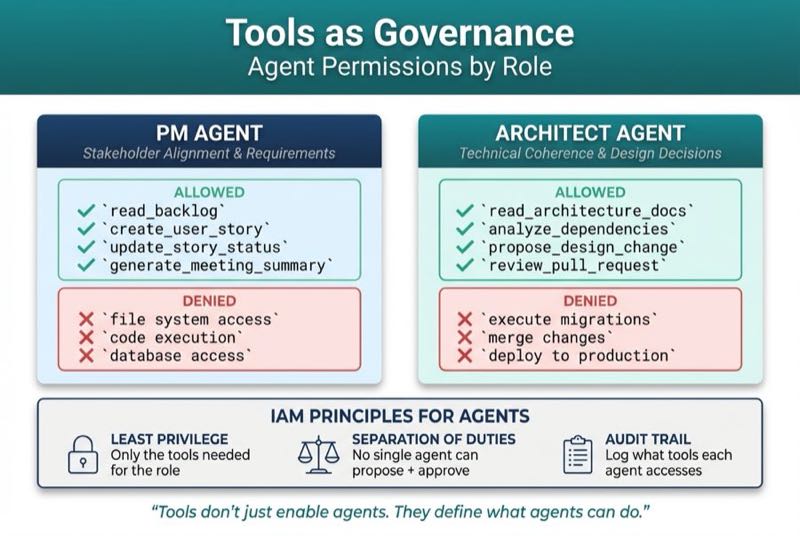
Tool permissions are the new IAM. The same principles apply:
- Least privilege. Give each agent only the tools it needs for its role.
- Separation of duties. No single agent should have tools that allow it to propose, approve, and execute changes.
- Audit trail. Log what tools each agent accesses. This is governance, not surveillance.
This is not constraint for its own sake. This is the same capability boundary design I discussed when mapping encapsulation to agents. Tools do not just enable agents. They define what agents can do.
Design your tool boundaries as deliberately as you design your class interfaces. An agent with unlimited tool access is an agent without meaningful architecture. It is the global variable of the agentic world.
Why This Matters Now
The MCP ecosystem is young. The standards are still evolving. The tool libraries are sparse compared to what they will become.
This is exactly when it matters most.
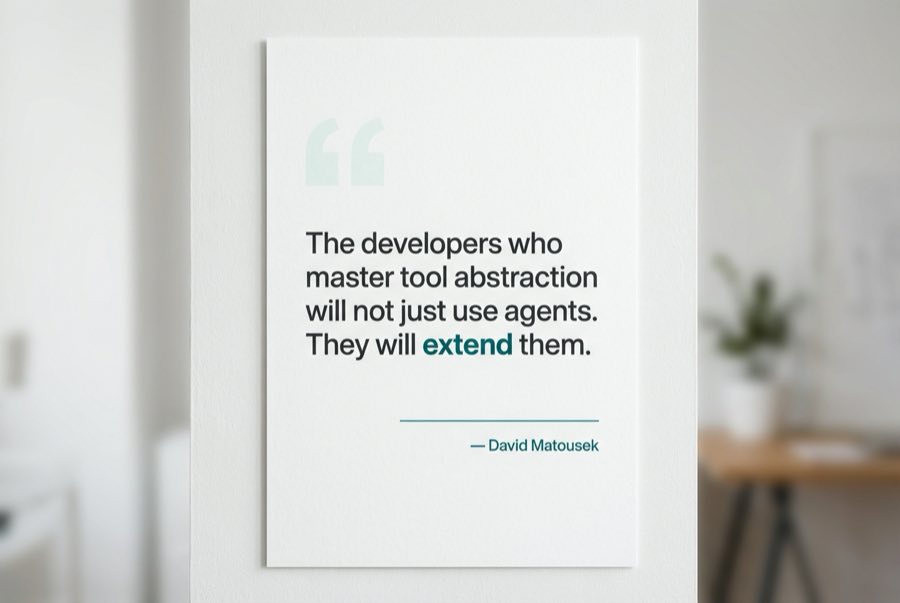
The developers who master tool abstraction now will not just use agents. They will extend them. They will build the MCP servers that others depend on. They will design the interfaces that shape how agents interact with enterprise systems.
Everyone else will prompt-engineer their way around missing tools. They will write increasingly elaborate instructions to compensate for capability gaps. They will hit walls that better tooling would dissolve.
You will compose capabilities like building blocks. You will add a new tool and watch your agents develop new abilities. You will design the interfaces that make complexity invisible.
My team lead and I learned that the right framework transforms skill into value. We had the capability from day one. What we lacked was the interface layer that connected that capability to outcomes.
Your agents can learn the same lesson.
What's Next
This is Chapter 3 of a series on Agentic-Oriented Development.
Coming next: Designing Your Agent's Inheritance Chain
Configuration is not a flat file. It is a hierarchy: global settings, project overrides, module specifics. The way context flows from general to specific mirrors the way behavior flows through class inheritance. Get it right, and your agents understand their world. Get it wrong, and every interaction starts from scratch.